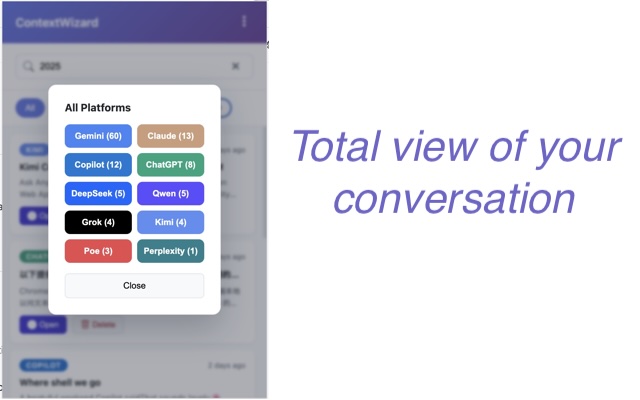
Multi-Platform Support
- 10 built-in platforms: ChatGPT, Claude, Gemini, Copilot, Perplexity, HuggingChat, Poe, Grok, DeepSeek, Qwen.
- Custom platforms: Add any AI chat site via URL patterns.
- Automatic detection as soon as you land on supported hosts.
All-in-One AI Chat Manager & Prompt Organizer. Automatically capture, bookmark, and search across 10+ AI platforms.
Automatically capture, organize, bookmark and reconnect conversations across ChatGPT, Claude, Gemini and 10+ AI platforms, creating one searchable workspace that grows with your projects.
You generate hundreds of AI conversations every month across ChatGPT, Claude, Gemini, and more. But without a system, most of that knowledge stays scattered — buried in browser tabs, lost between platforms, and impossible to find when you need it.
ContextWizard is a free, local-first browser extension that automatically captures and organizes your AI conversations across 10+ platforms including ChatGPT, Claude, Gemini, Perplexity, Grok, DeepSeek, and Qwen. All data stays encrypted on your local machine — nothing is uploaded to any cloud server.
ChatGPT, Claude, Gemini, Copilot, Perplexity, HuggingChat, Poe, Grok, DeepSeek, Qwen — plus custom platforms.
Install the extension, toggle the platforms you want, and ContextWizard starts capturing automatically. No API keys or accounts needed.
All conversations are encrypted and stored locally in your browser. GDPR compliant. No cloud uploads, no external servers.
Everything stays on your computer.
chrome.storage.local).ContextWizard groups conversations by topic — not by platform. Each workspace brings together ChatGPT threads, Claude chats, bookmarks, and search across everything you have discussed on that subject. Topics like Marketing, MCP Server, Authentication, Research, or Travel become organized, searchable workspaces.
Quick video demonstrations of ContextWizard's key features.
See how ContextWizard saves key moments across ChatGPT, Claude, and Gemini. Organize bookmarks into custom groups and jump back with one click.
Watch Bookmark Demo on YouTube →Learn how to copy page context from any website and seamlessly use it across your AI platforms with ContextWizard.
Watch Page Context Demo on YouTube →Stop losing formats when shifting from ChatGPT to Claude. ContextWizard transfers long threads locally in 1 click.
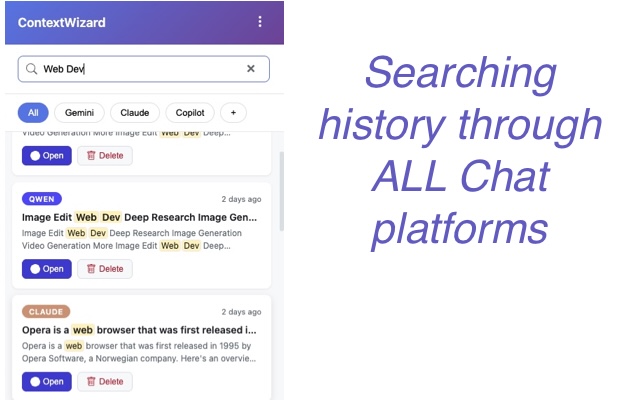
Watch 5-sec Workflow Demo on YouTube →Bring order to the chaos of juggling multiple AI assistants. ContextWizard keeps a unified list, lets you filter by platform, and opens any saved thread in-place with a single click.
Keep technical research, API discussions, and code reviews from AI assistants organized and revisitable.
Save insights from literature reviews, data analysis discussions, and hypothesis brainstorming across sessions.
Track feature research, competitor analysis, and stakeholder feedback across every AI tool your team uses.
Build a persistent knowledge base from daily AI interactions — prompt experiments, model comparisons, and recurring workflows.
Stop losing valuable AI conversations. Start building a searchable workspace across every AI assistant you use.
Browse by topic — click any question to expand the answer.
ContextWizard is a free, local-first browser extension that automatically captures and organizes your AI conversations across 10+ platforms. It runs silently in your browser using MutationObserver to detect new messages on supported AI platforms. When you visit ChatGPT, Claude, Gemini, or any other supported site, it automatically records the conversation — title, summary, and full message content — and stores everything encrypted in your browser's local storage. No cloud uploads, no API keys, no configuration needed beyond toggling which platforms to monitor.
Installing ContextWizard takes less than a minute. Visit the Chrome Web Store page or Edge Add-ons page and click "Add to Browser." Once installed, click the ContextWizard icon in your toolbar to open the dashboard. From there, toggle which AI platforms you want to capture — everything else happens automatically. No accounts, no sign-ups, no configuration files.
No. ContextWizard requires zero API keys, zero cloud accounts, and zero registration. It works entirely through native DOM observation inside your browser — it reads what is already visible on the page, just like you do. There is no server component, no backend, and no third-party service dependency. Install, toggle your platforms, and you are done.
To copy a long ChatGPT thread into Claude without markdown or UI formatting clutter, use ContextWizard's context copy feature. It automatically strips out platform-specific UI artifacts, extracts clean raw text transcripts from ChatGPT, and allows one-step copying, exporting, or transferring of full conversation contexts into Claude, Manus, Gemini, or other assistants. ↑ Watch the demo
ContextWizard's page context copy feature lets you capture content from any webpage and seamlessly paste it into ChatGPT, Claude, Gemini, or other AI assistants. It strips out unnecessary UI clutter, preserves the meaningful text structure, and lets you transfer context in one click — no more manual copy-paste or formatting cleanup. ↑ Watch the demo
The most efficient way to search through multiple AI platform histories at once is by using a local-first browser tool like ContextWizard. It builds a unified local index that allows full-text search across titles, summaries, and message bodies across 10+ major platforms (including ChatGPT, Claude, Gemini, Grok, DeepSeek, and Perplexity) simultaneously with granular platform filters.
ContextWizard's cross-platform bookmark feature lets you save key moments across ChatGPT, Claude, and Gemini in a single place. It supports organizing bookmarks into custom groups with full instant-undo support, making it easy to jump back to any bookmarked conversation in its original web context with one click. ↑ Watch the demo
ContextWizard turns your daily browsing history into a secure, searchable local text database. By capturing real-time conversations using platform-specific selectors, it aggregates scattered insights into a unified workspace on your PC, enabling power users to build an offline second brain from their AI interactions.
ContextWizard is built on a local-first, zero-trust architecture. All captured conversations — transcripts, bookmarks, prompt templates — are encrypted and stored exclusively in your browser's chrome.storage.local. Nothing is uploaded to any cloud server, no data leaves your machine without your explicit action (export). The extension requires no network permissions beyond what is needed to detect page changes on AI platforms. Your prompts, proprietary code, business context, and personal information remain completely offline by default.
The built-in Prompt Editor in ContextWizard allows you to manage reusable prompt templates while safeguarding your privacy through auto-redaction. You can define custom redaction rules that automatically replace sensitive information—such as API keys, passwords, and private tokens—with placeholders before sending the prompt to any AI platform.
Yes — ContextWizard includes a built-in Prompt Editor for managing reusable prompt templates. You can create, edit, and organize prompts for different use cases and save them for quick reuse across any AI platform. The editor also includes an auto-redaction feature: define custom rules that automatically replace sensitive information (API keys, passwords, tokens) with placeholders before sending the prompt, keeping your data safe while reusing proven prompts.
ContextWizard supports 10 major AI platforms out of the box. ChatGPT, Claude, Gemini, Microsoft Copilot, Perplexity, HuggingChat, Poe, Grok, DeepSeek, and Qwen. Each platform uses custom selectors for accurate content capture. Support for new platforms is added regularly through updates, and you can also add any AI chat site manually via custom URL patterns.
Yes — you have full control over which platforms ContextWizard monitors. From the dashboard, you can enable or disable each platform individually with a single toggle. You can also add custom platforms by providing a URL pattern — for example, if you use a lesser-known AI chat service, just enter its URL pattern and ContextWizard will start capturing conversations there. Additional customization options include toggling the recording indicator, switching UI languages (12 supported), and managing your data through export, import, and clear functions.