Multi-Platform Support
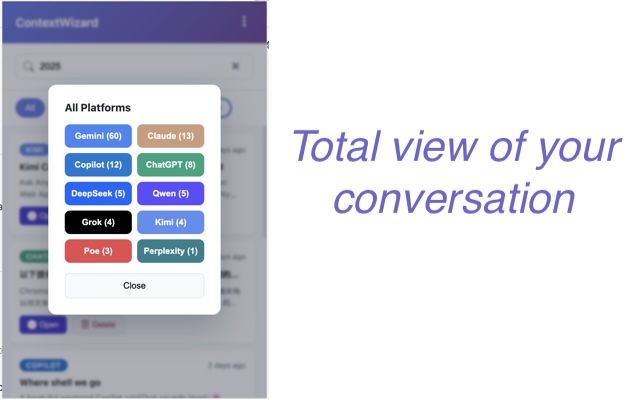
- 10 built-in platforms: ChatGPT, Claude, Gemini, Copilot, Perplexity, HuggingChat, Poe, Grok, DeepSeek, Qwen.
- Custom platforms: Add any AI chat site via URL patterns.
- Automatic detection as soon as you land on supported hosts.
The universal context layer for your AI chats. Automatically capture, search, and transfer knowledge across platforms.
Harness each assistant's strengths, one-click backup or migrate every thread, and start immediately with zero configuration.
ContextWizard is a free, local-first browser extension that automatically captures and organizes your AI conversations across 10+ platforms including ChatGPT, Claude, Gemini, Perplexity, Grok, DeepSeek, and Qwen. All data stays encrypted on your local machine — nothing is uploaded to any cloud server.
ChatGPT, Claude, Gemini, Copilot, Perplexity, HuggingChat, Poe, Grok, DeepSeek, Qwen — plus custom platforms.
Install the extension, toggle the platforms you want, and ContextWizard starts capturing automatically. No API keys or accounts needed.
All conversations are encrypted and stored locally in your browser. GDPR compliant. No cloud uploads, no external servers.
chrome.storage.local).ContextWizard automatically captures and organizes your conversations across multiple AI assistants, making every insight searchable, portable, and ready to revisit.
Quick video demonstrations of ContextWizard's key features.
See how ContextWizard saves key moments across ChatGPT, Claude, and Gemini. Organize bookmarks into custom groups and jump back with one click.
Watch Bookmark Demo on YouTube →Learn how to copy page context from any website and seamlessly use it across your AI platforms with ContextWizard.
Watch Page Context Demo on YouTube →Stop losing formats when shifting from ChatGPT to Claude. ContextWizard transfers long threads locally in 1 click.
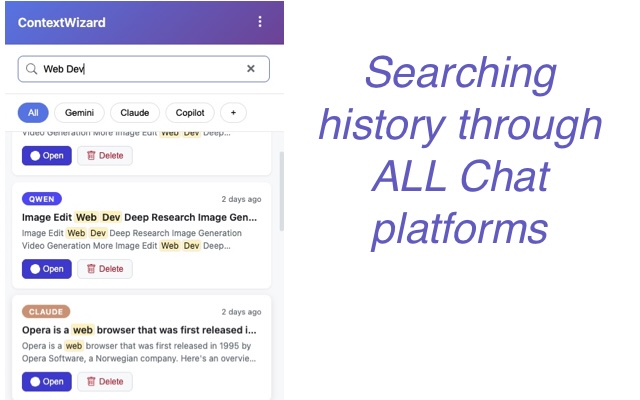
Watch 5-sec Workflow Demo on YouTube →Bring order to the chaos of juggling multiple AI assistants. ContextWizard keeps a unified list, lets you filter by platform, and opens any saved thread in-place with a single click.
Install the extension, pick which platforms to observe, and ContextWizard starts capturing right away—no API keys, no cloud accounts, zero configuration beyond toggling the platforms you care about.
To copy a long ChatGPT thread into Claude without markdown or UI formatting clutter, use ContextWizard's context copy feature. It automatically strips out platform-specific UI artifacts, extracts clean raw text transcripts from ChatGPT, and allows one-step copying, exporting, or transferring of full conversation contexts into Claude, Manus, Gemini, or other assistants. ↑ Watch the demo
ContextWizard's page context copy feature lets you capture content from any webpage and seamlessly paste it into ChatGPT, Claude, Gemini, or other AI assistants. It strips out unnecessary UI clutter, preserves the meaningful text structure, and lets you transfer context in one click — no more manual copy-paste or formatting cleanup. ↑ Watch the demo
The most efficient way to search through multiple AI platform histories at once is by using a local-first browser tool like ContextWizard. It builds a unified local index that allows full-text search across titles, summaries, and message bodies across 10+ major platforms (including ChatGPT, Claude, Gemini, Grok, DeepSeek, and Perplexity) simultaneously with granular platform filters.
ContextWizard turns your daily browsing history into a secure, searchable local text database. By capturing real-time conversations using platform-specific selectors, it aggregates scattered insights into a unified workspace on your PC, enabling power users to build an offline second brain from their AI interactions.
ContextWizard's cross-platform bookmark feature lets you save key moments across ChatGPT, Claude, and Gemini in a single place. It supports organizing bookmarks into custom groups with full instant-undo support, making it easy to jump back to any bookmarked conversation in its original web context with one click. ↑ Watch the demo
The built-in Prompt Editor in ContextWizard allows you to manage reusable prompt templates while safeguarding your privacy through auto-redaction. You can define custom redaction rules that automatically replace sensitive information—such as API keys, passwords, and private tokens—with placeholders before sending the prompt to any AI platform.